1. Write back / write through / write evict

These policies determine how to handle a write hit.

Hit means that the requested cache block exists at the current level cache.


Write back just handles the request at the current level cache only. Later, when this block would be evicted to the lower level, the modified data would be applied. In other words, the updated data would exist at the current level only.


Write through handles the request not only at the current level cache but to lower levels. In other words, the updated data would be exist at current level and lower levels.


Write evict passes the request to lower level and invalidates the cache block at the current level. In other words, the updated data would exist at the lower level only. 


2. Write allocation / no write allocation

These policies determine how to handle a write miss.

Miss means that the requested cache block does not exist at the current level cache.


No write allocation just passes the request to the lower level. 


Write allocation handles the request at the current level. In this case, the cache block would be fetched ahead or not, regarding to the following fetch policies.


3. Fetch on write / lazy fetch on read

Fetch on write: When a write miss is handled with write allocation policy, the cache block would be fetched ahead.


Lazy fetch on read: When a write miss is handled with write allocation policy, the cache block would not be fetched, and the data just written to the current level cache. In this case, the modified sectors must be marked, and when the cache block would be fetched for read hit, the modified sectors would be applied.


'Programming > Computer Architecture' 카테고리의 다른 글

Basic of the DRAM Subsystem  (0) 2019.04.19
echo 1 | sudo tee /sys/bus/pci/devices/<port>/remove
echo 1 | sudo tee /sys/bus/pci/rescan


'Programming > Linux' 카테고리의 다른 글

Ubuntu IKEV2 VPN 설정  (0) 2022.12.31
Ubuntu 한글 입력  (0) 2022.12.31
Piping ls to cp  (0) 2020.12.02
How to use GDB  (0) 2020.03.12
PhantomJS Installation on Ubuntu from source  (0) 2018.12.10

There are various kinds of synthesis and implementation strategies in Xilinx Vivado.

When you have timing violations with your own codes, which you can check with the timing report, you need to modify your own codes to shorten the critical paths. However the timing violation came from the IPs which are already proven, you can use other synthesis and implemenation strategies.


Different strategies makes different timing, area, and power

Someone gives an example.(https://miscircuitos.com/vivado-synthesis-and-implementation-strategies/)


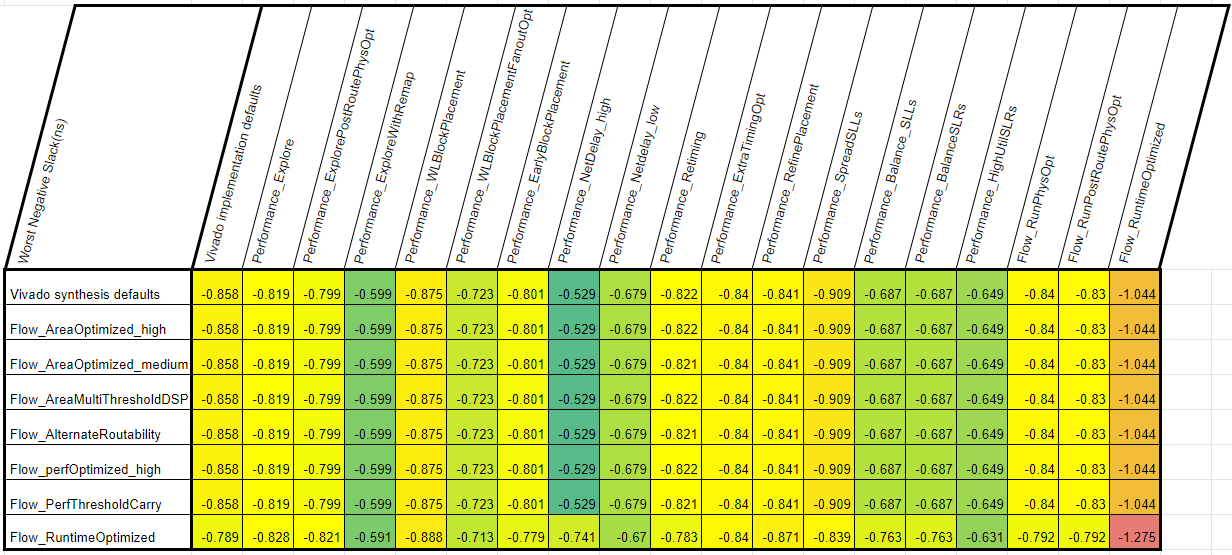
Below table shows my case. I cannot test for all of strategies, because it consumes so many time.

It seems that synthesis strategy make very few changes with my design.


There is no a absolute winner of synthesis and implementation strategy. You need to use various strategies but it may need some time, computing power and storages. In my case, I ran 8 synthesis strategies and 19 implementation strategies for each of synthesis. It takes about 2 days with 24 parallel processing on total 56 thread intel CPU, and it releases 96GB of data.


'Programming > Xilinx' 카테고리의 다른 글

SDK baremetal HW-time measurement  (0) 2021.12.07
SDK pointer vs array  (0) 2021.12.04
ERROR: [USF-XSim-62] 'elaborate' step failed with errors  (0) 2021.01.14
Vivado [Opt 31-67] Issue  (0) 2020.12.30
ZCU102 Evaluation Kit SODIMM issue  (0) 2020.12.21

When you need to check the execution time in Xilinx SDK,

you can use below code.

Note that the timer should be enabled

#include <stdio.h>
#include "xtime_l.h"

int main(void){
	XTime t;
    
    XTime_StartTimer(); //enable timer
    
    XTime_GetTime(&t);
    printf("t = %lf\n", (double)t/COUNTS_PER_SECOND);
    
    return 0;
}

When you are using Xilinx SDK, you have to distinguish pointer and array. If you declare a variable as a pointer, you have to use it as a pointer not array. If a pointer is used as array, synchoronous interrupt handler(exception) may occur.


volatile unsigned int* mem;

for(i=0; i<SIZE; i++){
	mem[i] = i; //Synchoronous Interrupt Handler(exception) may occur
    //you have to use like this
    //*(mem+i) = i;
}

Bash if statement can be used with regular expression

if [[ "hello world" =~ "hello" ]] ## this is true
then
    echo "'hello world' has 'hello'"
fi

if [[ "hello" =~ "hello world" ]] ## this is false
then
    echo "'hello' has 'hello world'"
fi

if [[ "hello world" =~ e.* ]] ## this is true
then
    echo "'hello world' has 'e' followed by any character"
fi

Note that

 - the bracket should be double

 - use "=~", not "~="

 - use the regular expression without quotation mark

 - the lefthand-side should be a container

'Programming > Bash Script' 카테고리의 다른 글

Bash script argument parsing with getopts  (0) 2020.01.23
Bash script for statement  (0) 2018.05.21
Bash Script case statement  (0) 2018.02.06
Bash Script Variable Split by Space  (0) 2018.02.04
Bash Script Echo  (0) 2018.02.04

When you are using very large concatenated signals in Vivado simulation, it may cause elaborate step failure. You can release this problem with breaking into several smaller signals.


AR# 62969 says it may be fixed in 2015.1 version, however, it still exists in 2017.2 version

www.xilinx.com/support/answers/62969.html

'Programming > Xilinx' 카테고리의 다른 글

SDK baremetal HW-time measurement  (0) 2021.12.07
SDK pointer vs array  (0) 2021.12.04
Vivado [Opt 31-67] Issue  (0) 2020.12.30
ZCU102 Evaluation Kit SODIMM issue  (0) 2020.12.21
UART terminal on remote RaspberryPI  (0) 2020.12.18

When you get [Opt 31-67] Problem from running Vivado opt_design phase, you have to check all the related input/output pins. If one of your input/output pins is not connected, it can occur. And also, even if you connect all the input/output pins, it can occur with a non-driving output pin.

'Programming > Xilinx' 카테고리의 다른 글

SDK pointer vs array  (0) 2021.12.04
ERROR: [USF-XSim-62] 'elaborate' step failed with errors  (0) 2021.01.14
ZCU102 Evaluation Kit SODIMM issue  (0) 2020.12.21
UART terminal on remote RaspberryPI  (0) 2020.12.18
Multi Hardware Server Issue  (0) 2020.12.18

Because the original SODIMM from Micron no longer produced, the newer ZCU102 boards have changed SODIMM (You can find this issue from Xilinx AR#71961).

If you have ZCU102 Evaluation board labeled as 0432055-05 and you are using some old version of Vivado, you may have to change some parameters from either of followings:


1. Change in each Vivado project

You can change some DRAM parameters from block design - Zynq Ultrascale+ MPSoC - DDR Controller


2. Change in board preset

You can find a board preset file from <Xilinx install directory>/Vivado/<version>/data/boards/board_files/zcu102/<board_version>/preset.xml


Among so many parameters, you have to change 4 parameters: 

PSU__DDRC__DRAM_WIDTH 8 Bits -> 16 Bits

PSU__DDRC__DEVICE_CAPACITY 4096 MBits -> 8192 MBits

PSU__DDRC__BG_ADDR_COUNT 2 -> 1

PSU__DDRC__ROW_ADDR_COUNT 15 -> 16


If you have changed the board preset, you don't have to change from your Vivado project. You can just use auto preset.


'Programming > Xilinx' 카테고리의 다른 글

SDK pointer vs array  (0) 2021.12.04
ERROR: [USF-XSim-62] 'elaborate' step failed with errors  (0) 2021.01.14
Vivado [Opt 31-67] Issue  (0) 2020.12.30
UART terminal on remote RaspberryPI  (0) 2020.12.18
Multi Hardware Server Issue  (0) 2020.12.18

You can use a raspberry pi for a remote UART terminal


The instructions are as followed:


1. Set up the Rasberry pi

 - OS: Raspbian

 - apps: openssh-server, screen

# sudo apt-get install -y openssh-server screen


2. Install USB-UART driver

 - Download linux source from https://www.silabs.com/developers/usb-to-uart-bridge-vcp-drivers


CP210x USB to UART Bridge VCP Drivers - Silicon Labs

The CP210x USB to UART Bridge Virtual COM Port (VCP) drivers are required for device operation as a Virtual COM Port to facilitate host communication with CP210x products. These devices can also interface to a host using the direct access driver.

www.silabs.com

 Download Linux 3.x.x/4.x.x VCP Driver. You may need to sign up.

※ Raspberry pi kernel version is 5.4.79-v7+(2020.12.18), but it works!


 - Unzip the downloaded source

 - Compile

 You may need the kernel source. You can use rpi-source(github.com/notro/rpi-source/wiki)

# cd <unzip dir>
# sudo apt-get install git bc bison flex libssl-dev
# sudo wget https://raw.githubusercontent.com/notro/rpi-source/master/rpi-source -O /usr/local/bin/rpi-source
# sudo chmod +x /usr/local/bin/rpi-source
# rpi-source
# make

 - Install module

# sudo cp cp210x.ko /lib/modules/`uname -r`/kernel/drivers/usb/serial
# sudo insmod /lib/modules/`uname -r`/kernel/drivers/usb/serial/usbserial.ko
# sudo insmod cp210x.ko


3. Connect FPGA borad's UART and Raspberry pi's USB


4. Remote access to the RapberryPI


5. Use terminal

# sudo screen /dev/ttyUSB0 115200

'Programming > Xilinx' 카테고리의 다른 글

SDK pointer vs array  (0) 2021.12.04
ERROR: [USF-XSim-62] 'elaborate' step failed with errors  (0) 2021.01.14
Vivado [Opt 31-67] Issue  (0) 2020.12.30
ZCU102 Evaluation Kit SODIMM issue  (0) 2020.12.21
Multi Hardware Server Issue  (0) 2020.12.18

+ Recent posts